 Por mariogarcia
 It’s 8:03 AM. Before the coffee, before the first email, someone on your finance team has already opened a tab to the European Central Bank, copied ten or twelve exchange rates, and pasted them into JD Edwards, one by one. I’ve seen it with my own eyes, in more than one company. And it’s not an isolated case: some companies have been paying for an external tool for years to do exactly this — something their own ERP can already handle if someone sits down for half an hour to build it.
The problem nobody questions
Nobody questions whether loading exchange rates by hand still makes sense. It happens because it’s always been done that way, or because someone bought a tool years ago and it stuck around, generating a monthly invoice nobody reviews anymore. The real cost isn’t the license fee. It’s the time, the risk of a clumsy finger changing a decimal, and the person who interrupts real work every morning to type numbers instead of think. 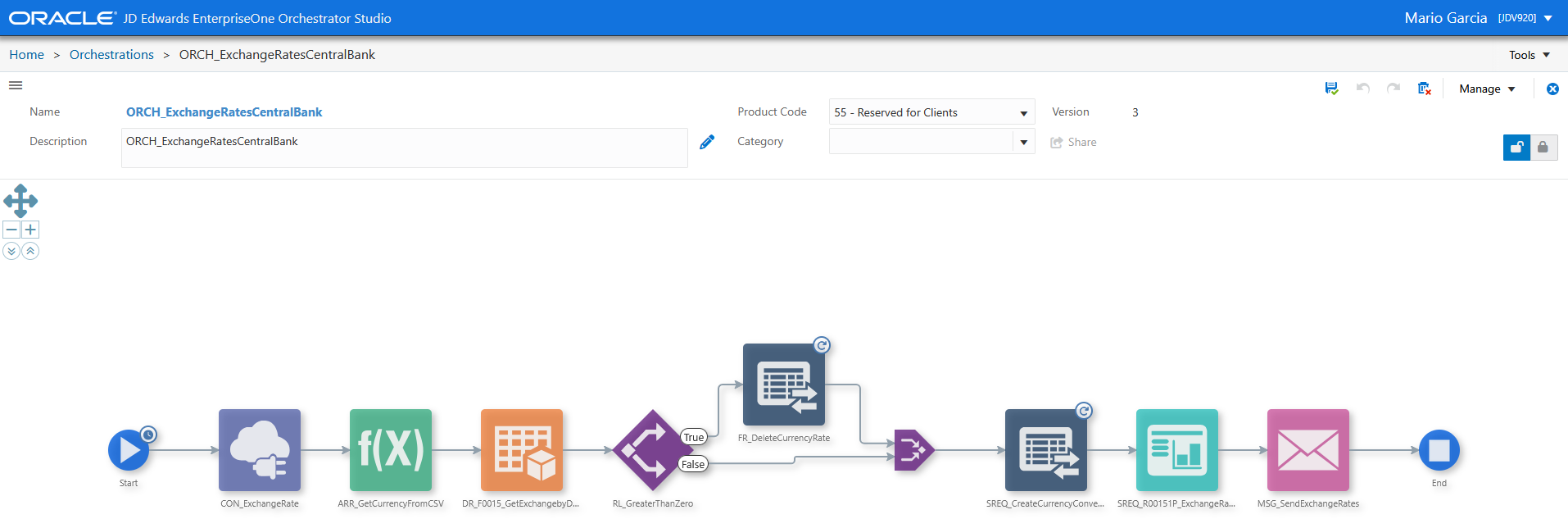
What I’m teaching in my upcoming trainings
Over the next few weeks I’m running Orchestrator training for three different companies, and this time I’m changing my go-to example. Until now I used a generic data source to demonstrate exchange rate loading. This time I’m using the European Central Bank’s free public API, and I build the entire flow live in front of the students, using almost every UDO type Orchestrator offers, in a single example. Here’s the flow, step by step:
- A Connector that calls the ECB’s API.
- A Custom Request, “Create Array,” that turns the CSV the ECB returns into a workable array.
- A Data Request that checks whether a previous rate load already exists for the day, and returns an array of whatever it finds.
- A Rule that asks: is there anything already loaded? If so, it iterates and deletes it through a Form Request, so nothing gets duplicated or left behind.
- A Rule that iterates over the array of new exchange rates.
- A Form Request against P0015A that loads each rate, one by one.
- A Report, R00151P, filtered by today’s date, generating a report of everything loaded.
- A Notification that sends that report to the people responsible, confirming the day’s load is done and ready for review.
One Connector, one Custom Request, one Data Request, two Rules, two Form Requests, one Report, closing with a Notification. If you want to show someone what Orchestrator can do in a single exercise, it’s hard to find a better example.
How the call to the ECB API actually works
The part my students ask about most is how the Connector talks to the source. The European Central Bank publishes its reference rates through its SDMX API, and lets you request the result directly as CSV instead of the default XML, which makes life a lot easier for the Custom Request that follows. The call to get every euro exchange rate for a specific day looks like this:
GET https://data-api.ecb.europa.eu/service/data/EXR/D..EUR.SP00.A?format=csvdata&startPeriod=2026-08-25&endPeriod=2026-08-25A quick look at the key D..EUR.SP00.A: D means daily frequency, the two dots leave the currency dimension open so every available currency comes back, EUR is the base currency, and SP00.A identifies the ECB’s standard reference rate series. The format=csvdata parameter is what forces the response to come back as CSV instead of XML, ready for the “Create Array” Custom Request to turn into something the rest of the orchestration can loop through. No API key, no subscription. It’s a public API, maintained by a central bank, and honestly more reliable than most paid sources I still see companies contracting.
The real impact, in numbers a CFO understands
This is where it’s worth speaking the language that actually matters in a leadership meeting. A well-done manual load usually takes between 15 and 30 minutes every morning, depending on how many currencies a company handles. Multiply that by the working days in a year and you’re looking at several full workdays spent exclusively on copying and pasting numbers. Or add the monthly cost of an external tool many companies are still paying for to solve something their own JD Edwards can already solve on its own. And human error isn’t a theoretical risk. A misplaced decimal in an exchange rate doesn’t stay in a spreadsheet — it flows into intercompany billing, inventory valuation, financial results. Automate this with Orchestrator and that risk disappears entirely, because the machine doesn’t get distracted or fat-finger a number.
Why I teach with real problems, not demos
Every time I run a training, I ask students to bring their own problems. I don’t use the exchange rate example because it’s the only use case Orchestrator has — I use it because it’s the perfect starting point: in a couple of hours, everyone understands Connectors, Custom Requests, Data Requests, Rules, Form Requests, Reports, and Notifications working together, solving something their company actually needs. From there, what I call a virtuous circle kicks in: students pay more attention because the example is theirs, they engage more because they see it applied to their own system, and I, in turn, run into real problems from different businesses that make me a better architect with every training. If your company is still loading exchange rates by hand, or still paying for something Orchestrator solves for free, tell me. There are plenty more automations like this one waiting for someone to sit down and build them, and I’d love for yours to be the next one we solve together — whether that’s in a training, a custom architecture, or a consulting session.