 Por mariogarcia
 The email nobody reads
There’s a scene that repeats itself in almost every Orchestrator project I’ve reviewed.
The Orchestrator works. It detects something, processes data, triggers a notification. So far, so good.
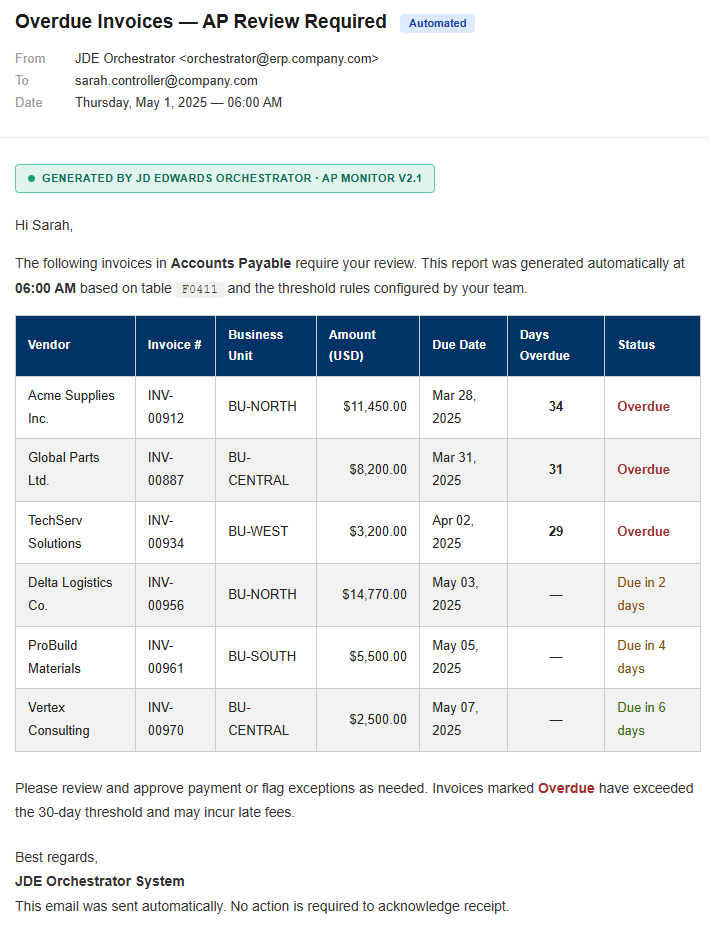
But the email that lands in the controller’s inbox looks like this: a block of plain text with values separated by commas or line breaks. No structure. No visual hierarchy. No clear way to tell what matters and what doesn’t.
Nobody reads it carefully. It’s not designed to be read — it’s designed so the system can say it sent an alert. That’s not professional automation. That’s sloppy automation.
The actual technical problem
When your Orchestrator processes a set of records — pending invoices, inventory lines, reconciliation discrepancies — the natural output is a JSON array. The problem is that JSON dumped directly into an email body is unreadable to anyone who isn’t a developer. What you need is to convert it into an HTML table before sending. And that’s where Groovy comes in.
The method signature most tutorials skip
This is where most tutorials fail: they show a generic Groovy script that won’t compile inside the Orchestrator because it doesn’t respect the method signature JDE expects.
Here’s the complete script, ready to paste into a Groovy step in your Orchestrator:
import com.oracle.e1.common.OrchestrationAttributes;
import groovy.json.JsonSlurper;
import java.text.SimpleDateFormat;

HashMap<String, Object> main(OrchestrationAttributes orchAttr, HashMap inputMap)
{
    HashMap<String, Object> returnMap = new HashMap<String, Object>();

    try {
        // We receive the JSON array from the previous Orchestrator step
        String jsonInput = (String)inputMap.get("inputJsonArray");

        orchAttr.writeDebug("JSON received: " + jsonInput);

        // Parse the JSON array
        def records = new JsonSlurper().parseText(jsonInput);

        if (records == null || records.isEmpty()) {
            orchAttr.writeWarn("JSON array came back empty. No HTML table will be generated.");
            returnMap.put("outputHtmlTable", "<p>No records found.</p>");
            return returnMap;
        }

        // Build the HTML table with inline styles
        // (inline is mandatory for email client compatibility)
        def html = new StringBuilder();

        html.append("<table border='1' cellpadding='8' cellspacing='0' style='border-collapse:collapse; font-family:Arial, sans-serif; font-size:13px; width:100%;'>");

        // Dynamic headers generated from the first object's keys
        // Add a new field to the JSON tomorrow and the table updates itself
        def headers = records[0].keySet();

        html.append("<tr style='background-color:#003366; color:#ffffff; text-align:left;'>");
        headers.each { h ->
            html.append("<th style='padding:8px; border:1px solid #cccccc;'>${h}</th>");
        }
        html.append("</tr>");

        // Data rows with alternating colors for readability
        records.eachWithIndex { row, index ->
            String rowColor = (index % 2 == 0) ? "#ffffff" : "#f2f2f2";
            html.append("<tr style='background-color:${rowColor};'>");
            headers.each { h ->
                def cellValue = (row[h] != null) ? row[h].toString() : "";
                html.append("<td style='padding:8px; border:1px solid #cccccc;'>${cellValue}</td>");
            }
            html.append("</tr>");
        }

        html.append("</table>");

        orchAttr.writeDebug("HTML table generated successfully with " + records.size() + " rows.");

        returnMap.put("outputHtmlTable", html.toString());

    } catch (Exception e) {
        orchAttr.writeWarn("Error generating HTML table: " + e.getMessage());
        returnMap.put("outputHtmlTable", "<p>Error processing data: " + e.getMessage() + "</p>");
    }

    return returnMap;
}
The details that make it production-ready
Named input and output. The JSON comes in as inputJsonArray from the previous step and the table goes out as outputHtmlTable. Those are the exact names you map in the step configuration inside the Orchestrator.
Null handling. If a cell comes back null, the script doesn’t break — it returns an empty cell. Small detail that prevents production failures with real data.
Empty array control. If the previous step returns no records, the email doesn’t arrive broken. It arrives with a clean message. That’s what separates an example script from one that’s client-ready.
Dynamic headers. Generated from the first JSON object’s keys. Add a new field tomorrow and the table updates itself, without touching the script.
Alternating rows. White and light grey. Zero extra implementation cost, doubled readability for whoever receives the report.
Debug and warn logs. The orchAttr.writeDebug and orchAttr.writeWarn calls are your eyes inside the Orchestrator Log when something breaks in a client environment. Always include them.
The business impact nobody is measuring
I know this sounds minor. It’s an email. How important can the format be?
More than it seems.
When the controller receives a clean table, they make decisions in seconds. When they receive a text block they have to interpret, it takes minutes — and they make reading errors. In an approval process that runs three times a week, you’re talking about 30 to 60 minutes of weekly cognitive friction that simply disappears.
And something harder to measure but equally real: perceived system quality. An Orchestrator that sends structured, professional notifications doesn’t look like a homegrown automation. It looks like a production system. That directly affects how much trust the leadership team places in the tool — and how much budget and scope they give it going forward.
What this opens up
This full pattern — JSON array, Groovy with native JDE signature, HTML table with inline styles, edge case handling — is exactly the kind of detail I cover in the Advanced Orchestrator course.
If you want to build Orchestrators that don’t just work but look like they were designed by someone who knows what they’re doing, reach out.
Hello Mario
Hope you are doing well
Thank you for sharing these wonderful ideas and solutions regarding the orchestration.
any how if you can share with me where exactly to add the groovy script is it a custom function or from the output step (minipulate output)
Thanks again
Mohamed
Hi Mohamed, this is a custom request. you need define inputJsonArray as an input and you get the html table as an output, later you can put the variable on a message or notification.